Claude AI in 2026 is a powerful AI assistant for writing, research, coding, analysis, and everyday productivity.
Claude is an AI assistant made by Anthropic, an AI safety company based in San Francisco. People use it for writing, coding, research, data analysis, studying and business automation. This guide covers what Claude is, which models and tools are available, how much each plan costs in different regions, and whether it’s the right AI chatbot for you.
After reading the article you should have clear understanding about Claud ai.
What Is Claude AI in 2026?
Claude is a conversational AI assistant, similar to ChatGPT and Google Gemini. It’s built on large language models (LLMs) trained by Anthropic with a strong focus on safety, honesty and helpfulness. You can chat with it on the web, on iPhone and Android, on desktop, or build with it through the Claude API.
Claude is known for:
- Long, well-structured writing and editing
- Strong coding and debugging ability
- Analysis of long documents, PDFs, spreadsheets and images
- A calm, natural conversational style
Claude Models Explained: Fable, Opus, Sonnet and Haiku
Anthropic offers several model families for different needs. The current lineup includes:
- Claude Fable 5.1: a top-tier model with extra safety measures in sensitive areas such as biology and cybersecurity.
- Claude Opus 5.5: a highly capable model for complex reasoning, long projects and demanding coding work.
- Claude Sonnet 5.5: the balanced all-rounder, with strong quality and good speed. It’s what most people use day to day.
- Claude Haiku 4.5: the fastest and most economical model, suited to quick tasks and high-volume use.
Anthropic also has a more advanced Mythos tier above Opus. Its first model, Claude Mythos Preview, is limited to a small number of trusted organizations and isn’t publicly available. Which models you can use depends on your plan.
Key Features of Claude
1. Chat on web, mobile and desktop. Use Claude at claude.ai or in the iOS, Android and desktop apps.
2. Web search and Research. Claude can search the web for current information and run deeper multi-step research.
3. Projects and memory. Group chats and files into projects, and let Claude remember your preferences if you turn memory on in Settings.
4. Artifacts. Claude can build documents, web pages, small apps, charts and tools that appear next to the chat.
5. File creation. Claude can create Word, Excel, PowerPoint and PDF files you can download.
6. Claude Code. An agentic coding tool that lets developers hand coding tasks to Claude from the terminal, desktop app or mobile app.
7. Claude Cowork. An agentic desktop app for non-developers, for knowledge-work tasks such as organizing files and producing documents.
8. Claude in Chrome, Excel and PowerPoint. Browser, spreadsheet and slide agents that work inside the tools you already use.
9. Claude Tag for Slack. Tag @Claude in Slack to delegate tasks to the whole team.
10. Claude API and Claude Platform. For developers and companies building their own AI-powered products.
Claude AI Pricing Plans (2026)
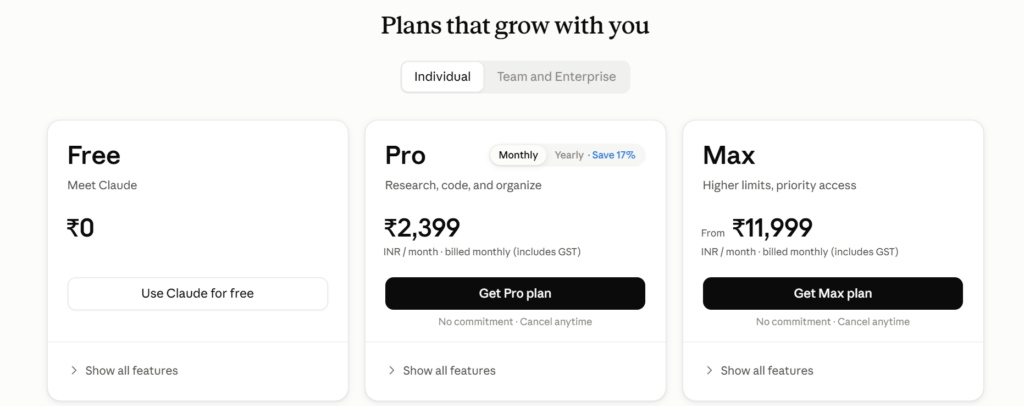
Claude has five plans: three for individuals (Free, Pro, Max) and two for organizations (Team, Enterprise).
Claude Free
Claude has a permanent Free tier at $0. It’s good for everyday chat with usage limits. The Free plan does not include Claude Code. Claude Cowork is not free either; it starts at Pro. Claude AI Pricing: Pro & Max Subscription Plans in Sept 2026 +2
Claude Pro
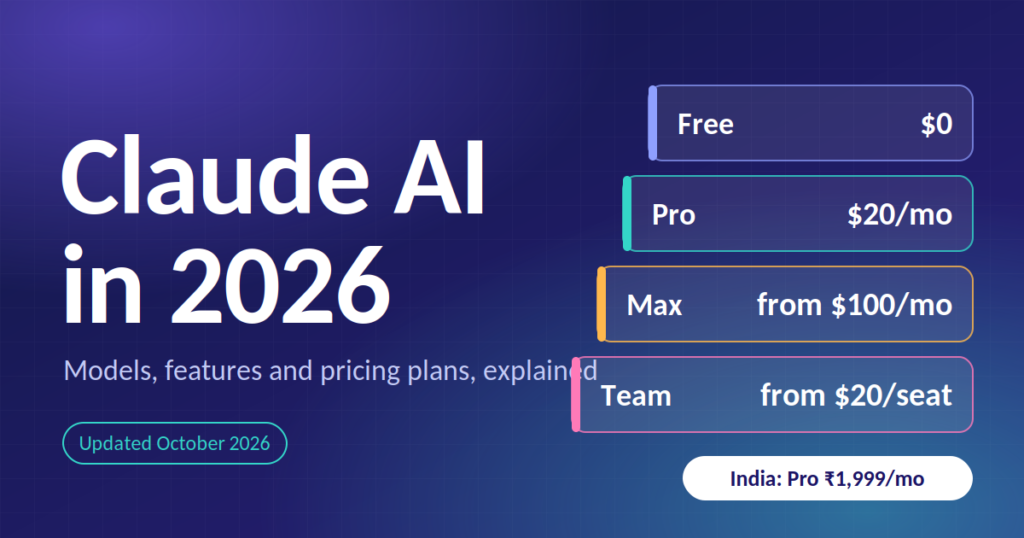
Pro is $17 per month billed annually, or $20 billed monthly. It adds Claude Code, Claude Cowork, Research and Projects, with at least 5x the usage per 5-hour session of the Free plan. It’s the right fit for most students, writers, freelancers and professionals. vantagepointpalpa
Claude Max
Max costs $100 a month for 5x Pro usage or $200 a month for 20x Pro usage. It suits heavy users such as developers and researchers who use Claude for hours every day. It adds substantially higher usage, higher output limits, early access to advanced features and priority access at busy times. benchlmsuprmind
Claude Team
Team is for groups of 2 to 150 people. A standard seat is $20 per seat per month billed annually ($25 billed monthly), and a premium seat is $100 per seat per month billed annually ($125 monthly). It includes central billing, SSO and admin controls, and your content isn’t used for model training by default. vantagepointvantagepoint
Claude Enterprise
Enterprise is priced at $20 per seat plus usage billed at API rates. It’s designed for large organizations that need security, compliance and administration at scale. Contact Anthropic’s sales team for details. vantagepoint
Quick comparison
| Plan | Price | Best for |
|---|---|---|
| Free | $0 | Trying Claude, casual use |
| Pro | $17/mo annual, $20/mo monthly | Students, creators, professionals |
| Max 5x / 20x | $100 / $200 per month | Power users, developers |
| Team | From $20 per seat per month (annual) | Small and mid-sized teams |
| Enterprise | Custom, plus usage | Large organizations |
Claude Pricing by Country
Prices differ by region because of currency and local tax.
India. Anthropic introduced India-specific pricing so users can pay in Indian rupees. Claude Pro is ₹1,999 per month, Claude Max is ₹11,999 (5x) and ₹23,999 (20x), and Team starts at ₹2,399 per user per month. Pro is ₹1,999 per month on annual billing or ₹2,399 on monthly billing. Prices include local taxes, so the price you see at checkout is what you pay. At the time of the launch, UPI payments weren’t supported. What Are the New India-specific Prices for Claude AI? – AIM +3
Europe. Claude Pro is listed at €15 per month billed annually or €18 monthly, with Max from €90 per month and Team standard seats from €18 per seat. automateall
United States and most other markets. Prices are quoted in US dollars, as in the table above. Local taxes such as VAT or sales tax may be added at checkout.
Claude vs ChatGPT vs Gemini
- Writing and editing: Claude is often preferred for natural, nuanced writing and long documents.
- Coding: Claude Code is a major draw for developers.
- Ecosystem: ChatGPT and Gemini offer their own plugins, image generation and Google or Microsoft integrations. Check which features matter most to you.
- Price: Entry-level paid plans for all three sit around the same range, though local pricing and payment methods vary by country.
The best way to decide is to test each on your own tasks using the free tiers.
Who Should Use Claude?
- Students: summarizing papers, studying, essay feedback
- Writers and bloggers: drafting, editing, brainstorming, SEO outlines
- Developers: debugging, code review, building apps with Claude Code
- Marketers: campaign copy, content calendars, analysis
- Business teams: reports, research, internal automation via Team or Enterprise
- Researchers and analysts: long-document analysis and data work
How to Get Started With Claude
- Go to claude.ai or download the Claude app on iOS, Android or desktop.
- Sign up with your email or Google account.
- Start chatting on the Free plan.
- Upgrade to Pro or Max from your account settings when you hit your limits.
- Turn on features such as web search, Research and memory in Settings.
Tips for Better Results
- Be specific about your goal, audience and format.
- Give examples of what you want.
- Ask Claude to think step by step for complex problems.
- Specify length and structure, such as “5 bullet points” or “under 200 words”.
Claude ai Frequently Asked Questions
Is Claude AI free?
Yes. Claude has a free plan with usage limits. Claude Code and Cowork require a paid plan.
How much does Claude Pro cost?
$20 per month, or $17 per month billed annually, in the US. In India it’s ₹1,999 per month on annual billing or ₹2,399 monthly.
What is the difference between Claude Pro and Max?
Max has the same core features as Pro but much higher usage limits (5x or 20x), higher output limits and priority access.
Who makes Claude?
Claude is made by Anthropic.
Is Claude safe to use?
Anthropic builds Claude with a strong focus on safety. As with any AI tool, avoid sharing sensitive personal or confidential information unless your plan’s privacy terms cover it.
Does Claude work in India?
Yes. Claude is available in India with rupee pricing, and India is one of Anthropic’s largest markets.
Can I use Claude for coding?
Yes. Claude is widely used for coding, and Claude Code is available on Pro and above.
Is there a Claude app?
Yes, for iOS, Android and desktop, plus the web version.
Conclusion
Claude is one of the leading AI assistants in 2026, with a free plan to try, Pro for most people, Max for heavy users, and Team and Enterprise for organizations. Start on Free, and upgrade only when you consistently hit the limits.
Pricing and features change often. Always confirm current details on Anthropic’s official pricing page.